
« 123456 », « azerty », son prénom, sa date de naissance, le même mot de passe partout : c’est encore, hélas, le quotidien de millions de personnes — et le rêve des pirates. Un mot de passe faible ou réutilisé, c’est la porte d’entrée de vos comptes, de votre argent, de votre vie privée. La bonne nouvelle : créer des mots de passe vraiment solides et les retenir est plus simple qu’on ne le croit, une fois qu’on connaît les bons principes. Pas besoin d’être expert : quelques règles claires et un ou deux outils suffisent à protéger l’essentiel. Voici comment créer des mots de passe robustes, faciles à retenir, et surtout comment les gérer sans se compliquer la vie.
What makes a good (and a bad) password
A password protects access to an account; its strength depends on a few simple factors. LENGTH is the most important criterion: the longer the password, the harder it is to guess or « crack »; aim for at least twelve characters, and more if possible. UNPREDICTABILITY: a good password should contain nothing predictable: not your name, your birth date, your children’s or pet’s names, not a common word, not an obvious sequence (« azerty », « 1234 »). VARIETY: mixing uppercase, lowercase, numbers, and special characters strengthens the password; but length counts more than complex gibberish. UNIQUENESS: this is crucial; each important account should have its OWN password; reusing the same one everywhere is the most dangerous error (we return to this). What makes a BAD password: too short, based on personal information, a common word, a keyboard sequence, or — the worst — reused across multiple sites. A powerful trick: the PASSWORD PHRASE. Rather than an unreadable jumble, assemble several unrelated words into a sentence: « Cactus-Piano-Nuage-Vélo »; it’s long (therefore strong), unpredictable, and much easier to remember than a string of symbols. You can add a number and a capital letter to reinforce it further. What is it for? To PROTECT your accounts against hacking; to avoid a leak on one site compromising all your accounts; and to secure what matters (emails, bank, networks, purchases). The main idea: a good password is LONG, UNPREDICTABLE, and UNIQUE to each important account. The password phrase (several words assembled) combines strength and ease of memorization. And to manage all these different passwords without getting lost, a tool exists — the password manager —, which we will talk about. The essential to understand: the security of your accounts starts here, and it’s within your reach.
Un bon mot de passe doit être long (au moins 12 caractères), imprévisible (pas de mots courants ou de données personnelles) et unique (différent pour chaque compte important). Une phrase de mots aléatoires, comme “Cactus-Piano-Nuage-Vélo”, est plus facile à retenir et plus sûre qu’une suite de caractères complexes.
Si vous utilisez “123456” comme mot de passe, un pirate peut le deviner en quelques secondes. Mais avec “Piano7!Lune-Vélo”, même un ordinateur mettrait des années à le craquer.
How to create and manage your passwords
Here is a concrete and realistic method. Create LONG passwords — aim for at least twelve characters, ideally more; length is your best ally. Use the PASSWORD PHRASE — assemble several unrelated words: « Girafe-Vélo-Océan-Piano »; add a capital letter, a number, and a symbol to strengthen it; it’s solid and memorable. Make each account UNIQUE — never use the same password on two important accounts; thus, if one leaks, the others remain protected. Prioritize sensitive accounts — start by securing the most critical ones: your email (it serves to reset all others! ), your bank, your purchase accounts, your social networks; these are the ones you must protect first. Adopt a PASSWORD MANAGER — this is the modern solution to no longer have to remember everything: this digital safe generates strong and unique passwords, memorizes them, and fills them in for you; you only retain one master password (our guides on adopting a password manager). Enable two-factor authentication — on important accounts, add this second protection: even if your password leaks, an additional code is requested; it’s a very effective bulwark (our guides on enabling two-factor authentication). Do not share them recklessly — avoid writing your passwords on a visible sticky note or in an unprotected file, and do not send them by email or message. CHANGE them if in doubt — if a service alerts you to a leak, or if you suspect a hack, change the concerned password (and those reused elsewhere). A few TIPS: length trumps complex gibberish; a manager simplifies everything; and email is the account to protect first. In summary: make it long, use password phrases, one password per important account, prioritize sensitive accounts, adopt a manager, enable two-factor authentication, and change if in doubt. These simple gestures radically raise your security.
The right reflex. Remember two ideas that suffice for the essentials: LENGTH and UNIQUENESS. For length, forget the unreadable jumble of the type « X7&k9! » that you never remember: adopt the PASSWORD PHRASE, that is, several unrelated words assembled — « Cactus-Piano-Nuage-Vélo ». It’s long (therefore very strong), unpredictable, and yet easy to remember; add a capital letter, a number, and a dash or symbol to reinforce it further. For uniqueness, the rule is simple and non-negotiable: each important account has its OWN password, never the same twice. Why? Because if a site you use is hacked and your password leaks, the hackers will test it systematically on other services (our guides on not reusing the same password). Short or obvious passwords: « 123456 », « azerty », « motdepasse », a name: they break in a fraction of a second; they offer no protection. Personal information: name, birth date, children’s or pet’s names, city: all of this is easily found (social networks!) and predictable; ban it. Write them nowhere: a password written on a sticky note attached to the screen, in an unprotected file « passwords, » or in an email: it’s as if you’re offering it; use a manager (encrypted) or, at worst, a safe kept in a secure place, out of sight. Communicate them: never give a password by phone, email, or message, even to someone claiming to be your bank or a technical support team — it’s a classic scam (our guides on fake technical support). Neglect email protection: many protect their bank but neglect their email; it’s the most critical account, as it allows resetting almost all others. Forget two-factor authentication: on important accounts, leaving it out means you’re depriving yourself of a major bulwark. NEVER change after a leak: if a service announces a hack, not changing your password leaves the door open. Finally, believe that you are NOT affected: « I have nothing interesting to steal » is an illusion; your accounts, your identity, your email have value for a hacker. In summary: never reuse a password, ban short, obvious, or personal ones, do not write them carelessly or communicate them, protect your email first, enable two-factor authentication, and change after a leak. Avoiding these errors is already the essence of security.
Mistakes to avoid
Some habits, very widespread, seriously endanger your accounts. REUSING: this is the most dangerous mistake of all; using the same password on multiple sites means that a single leak compromises ALL these accounts; hackers systematically test leaked passwords on other services (our guides on not reusing the same password). Too SHORT or OBVIOUS passwords: « 123456 », « azerty », « motdepasse », a name: they break in a fraction of a second; they offer no protection. PERSONAL information: name, birth date, children’s or pet’s names, city: all of this is easily found (social networks!) and predictable; ban it. WRITE them anywhere: a password written on a sticky note attached to the screen, in an unprotected file « passwords, » or in an email: it’s as if you’re offering it; use a manager (encrypted) or, at worst, a safe kept in a secure place, out of sight. COMMUNICATE them: never give a password by phone, email, or message, even to someone claiming to be your bank or a technical support team — it’s a classic scam (our guides on fake technical support). Neglect email protection: many protect their bank but neglect their email; it’s the most critical account, as it allows resetting almost all others. Forget two-factor authentication: on important accounts, leaving it out means you’re depriving yourself of a major bulwark. NEVER change after a leak: if a service announces a hack, not changing your password leaves the door open. Finally, believe that you are NOT affected: « I have nothing interesting to steal » is an illusion; your accounts, your identity, your email have value for a hacker. In summary: never reuse a password, ban short, obvious, or personal ones, do not write them carelessly or communicate them, protect your email first, enable two-factor authentication, and change after a leak. Avoiding these errors is already the essence of security.
Warning: reusing the same password is the most dangerous mistake. If you had to remember only one warning, this would be it: never use the same password on multiple accounts. Here’s why it’s so serious. Regularly, sites — even large companies — are hacked, and users’ passwords end up in the wild. Hackers retrieve these lists and automatically test each « email + password » combination on dozens of other services: bank, email, social networks, purchase sites. If you have reused your password, a single leak on an unimportant site opens ALL your accounts at once. With a UNIQUE password per account, on the other hand, a leak is confined to a single site: the damage is limited. This is the rule that changes everything. Second warning: protect your EMAIL first. Often forgotten, the email is the central link: it’s through it that passwords for almost all other accounts are reset. A hacker who gains access to your email can, step by step, take control of everything else. Give it a particularly strong password and enable two-factor authentication. Third point: never COMMUNICATE a password to anyone, by phone, email, or message — no bank, no serious service will ask for it; any such request is a scam. And do not write them down in plain text on a visible paper or an unprotected file. Finally, if a service informs you of a leak, CHANGE the concerned password immediately, as well as all those you might have reused elsewhere. A unique password per account, a well-protected email, no sharing: these habits prevent the vast majority of hacks.
Frequently Asked Questions
How to create a strong but easy-to-remember password?
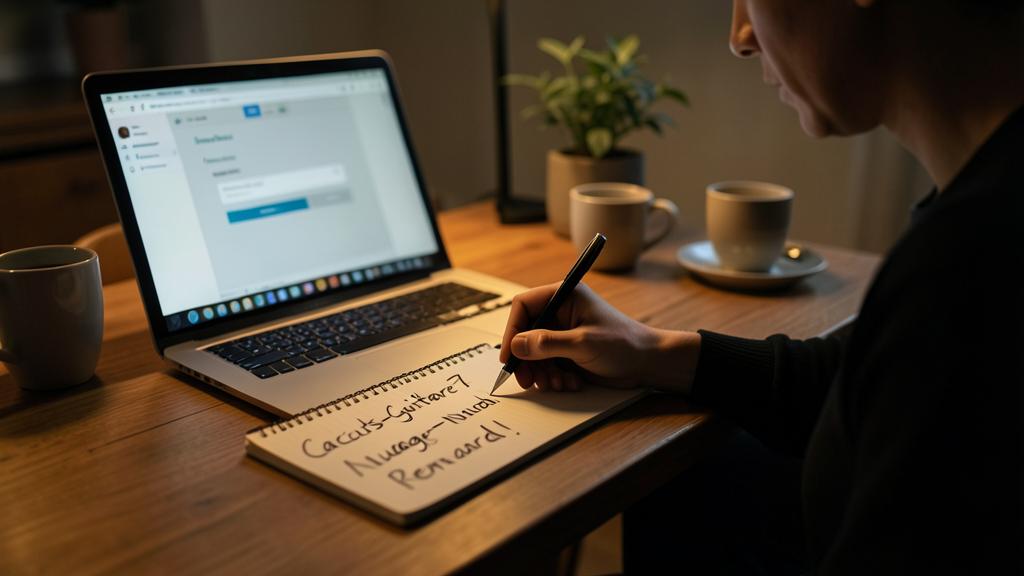
The best method is called the PASSWORD PHRASE, and it finally reconciles strength and memorability. The principle: instead of a jumble like « Kp7$x2 » that’s impossible to remember, assemble several unrelated words to form a long sequence: for example « Cactus-Guitare-Nuage-Renard ». It’s LONG (the most important criterion for strength), UNPREDICTABLE (words without relation cannot be guessed), and yet easy to remember because your brain retains well words and images. To reinforce it further, add a capital letter, a number, and a symbol: « Cactus-Guitare7-Nuage-Renard ! ». Choose words that don’t concern you personally (not your children’s names or your city, too predictable), but that YOU will remember. You can even create a silly story linking the words to better remember them. This technique allows you to have passwords that are both very robust and easy to remember. However, as each important account should have a DIFFERENT password, remembering dozens of phrases becomes impossible: that’s why the real comfort comes from a PASSWORD MANAGER, which creates and memorizes them for you — you only keep in mind one beautiful password phrase, that of the manager itself.
Should you change your passwords regularly?
Contrary to an old idea, changing your passwords systematically every three months is no longer recommended — and can even be counterproductive. Why? Because forced to change constantly, people create weaker and more predictable passwords (by adding just a number at the end, for example), or end up writing them somewhere. The modern recommendation is different: prioritize a LONG, UNIQUE, and solid password, and keep it as long as there’s no reason to change it. However, change it IMMEDIATELY in certain specific cases: if the service alerts you to a data leak or a hack; if you suspect your account has been compromised (unusual activity, unknown connection); if you accidentally entered your password on a suspicious site (phishing); or if you shared it and it’s no longer desirable. In other words: change on EVENT, not on calendar. A good complementary practice is to occasionally check if your addresses have been involved in a known leak (our guides on checking if your email address has been leaked). And if you use a manager, it will often alert you to weak, reused, or compromised passwords to change. Quality and uniqueness count more than the frequency of change.
Is a password manager really secure?
Yes, and it’s today’s best solution for most people — much more secure than real alternatives (reusing the same password, choosing weak ones, writing them on paper). A password manager is a CHIPPED digital safe: it stores all your passwords under strong protection, and you only need to remember one master password to access it. Its advantages are considerable: it generates long, random, and unique passwords for each account (impossible to guess); it fills them in automatically, which also protects you from certain phishing sites (it only fills in on the real site); and it alerts you to weak or compromised passwords. The legitimate question: « What if the manager itself is hacked? » Good password managers are designed so that even their creators cannot read your passwords (end-to-end encryption); the critical link remains your master password, which you must never forget or share. Choose a reputable manager, enable two-factor authentication on it, and remember well your master password. For the vast majority of users, adopting a manager represents a huge leap in security and comfort (our guides on adopting a password manager): you finally stop juggling with weak or reused passwords.
What to remember
The security of your digital life starts with your passwords, and protecting them is within your reach. A good password is primarily LONG (at least twelve characters, more if possible — the main criterion), UNPREDICTABLE (nothing personal or predictable, no common word, no keyboard sequence) and above all UNIQUE to each important account. The best technique to combine strength and memorability is the PASSWORD PHRASE: several unrelated words assembled (« Cactus-Piano-Nuage-Vélo »), reinforced with a capital letter, a number, and a symbol. To manage dozens of unique passwords without getting lost, the modern solution is the PASSWORD MANAGER: a chipped safe that creates, memorizes, and fills in passwords for you; you only retain one master password. Prioritize your email (it allows resetting almost all other accounts), and enable two-factor authentication on sensitive accounts (a bulwark that protects even in case of password leak). The most dangerous error, to be absolutely banned, is REUSING: the same password on multiple sites means that a single leak compromises all your accounts, because hackers systematically test stolen passwords on other services. Also avoid short or obvious passwords, personal information, writing them down in plain text, or communicating them to anyone (no serious service asks for them). Change your passwords mindlessly every three months no more, but change them on EVENT (reported leak, suspected hack). By adopting these simple principles — long password phrases, one password per important account, a manager, two-factor authentication, well-protected email —, you go from a fragile security to a real protection. These are not measures for experts: they are accessible reflexes that put you at the protection of the vast majority of hacks.
Want to make your digital tools more user-friendly? Our personalized training adapts to your level.
Leave a Reply
You must be logged in to post a comment.